A lot of IT problems start with a simple mismatch. A business moves email and file sharing to the cloud, keeps its core software on a local server, adds remote employees, and assumes everything will work together with minimal oversight. Then the tickets start piling up. Logins fail, backups become inconsistent, updates get missed, and no one is fully sure who owns what.
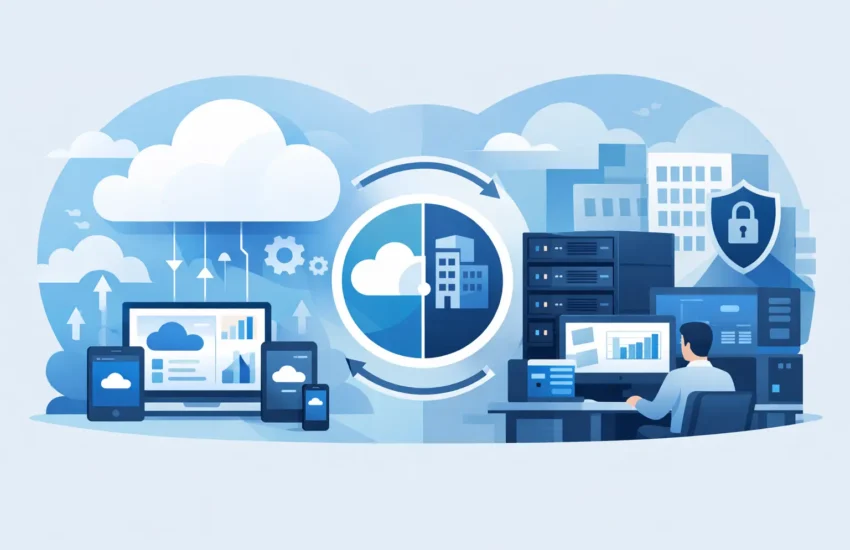
That is why cloud and on premise IT management matters. For most small and mid-sized businesses, IT is not fully in the cloud or fully on site. It is a mix of platforms, devices, users, vendors, and business systems that all need to stay available, secure, and supported day after day.
What cloud and on premise IT management really means
Cloud and on premise IT management is the ongoing work of supporting both hosted and in-house technology under one operational strategy. That includes cloud applications, user accounts, security policies, backups, and remote access, alongside local servers, office networks, workstations, printers, firewalls, and line-of-business systems.
For business leaders, the technical details matter less than the outcome. You need employees to log in without delays, shared files to stay accessible, systems to remain protected, and support requests to get resolved quickly. Good management brings all of those moving parts together so your team can work without unnecessary interruptions.
This is also where many businesses run into trouble. Cloud services are often treated as self-managing, while on-premise systems are handled only when something breaks. In reality, both environments need consistent attention. Cloud tools still require user administration, security controls, monitoring, licensing oversight, and data protection. On-premise systems still need patching, hardware checks, capacity planning, and physical network support.
Why most businesses end up with hybrid IT
Very few growing companies choose one environment and stay there forever. They add what solves the next problem.
A company might move email to Microsoft 365 for easier access and lower maintenance, but keep a local server because one critical application still depends on it. Another business may adopt cloud backups and hosted collaboration tools, while maintaining on-site network equipment and office workstations. This hybrid setup is common because it reflects how businesses actually operate.
There are good reasons for that. Cloud platforms can offer flexibility, easier remote access, and predictable subscription costs. On-premise systems can still make sense for specialized software, performance-sensitive workloads, compliance requirements, or existing investments that are not ready to be replaced.
The trade-off is management complexity. Once your environment spans both cloud and local infrastructure, you need visibility across both. If one side is well maintained and the other is neglected, problems spread quickly.
The operational risks of managing each side separately
When cloud and on premise systems are treated as separate worlds, businesses usually feel the effects in daily operations first.
User management becomes inconsistent. An employee changes roles, leaves the company, or needs access to a new system, and updates happen in one platform but not another. That creates delays for employees and security gaps for the business.
Monitoring gets fragmented. A cloud app may show no obvious issue while the office firewall is failing, or the local server may look healthy while account authentication in a cloud platform is creating access problems. Without centralized oversight, support becomes reactive instead of proactive.
Backup and recovery planning often suffers too. Many companies assume their cloud vendors cover everything, while local systems may rely on aging backup methods that are rarely tested. When data loss happens, assumptions turn into downtime.
Security is another pressure point. Multifactor authentication, endpoint protection, patching, access reviews, and policy enforcement should work together across the environment. If cloud security is strong but local systems lag behind, or the reverse, the business still carries unnecessary risk.
What effective cloud and on premise IT management should include
The goal is not just to keep systems running. It is to create a stable operating environment where problems are caught early, changes are handled cleanly, and your business can grow without constantly revisiting the same IT issues.
That starts with visibility. You should know what systems you have, where they live, who uses them, what depends on them, and how they are performing. For many small and mid-sized businesses, this sounds basic, but it is often where gaps begin.
From there, management should cover daily support, proactive monitoring, patching, user administration, access control, backup oversight, device management, and vendor coordination. If a business application touches both cloud and local infrastructure, support should not stop at the boundary between the two.
Support needs to follow the workflow
Employees do not care whether a problem lives in the cloud or in a server closet. They care that they cannot work.
If a user cannot access a file, send email, connect through VPN, print to the office printer, or open a business application, support should follow the issue through to resolution. That means your IT partner or internal team needs the ability to troubleshoot across platforms instead of passing blame between vendors.
Monitoring should be proactive, not occasional
Waiting for staff to report issues is expensive. By the time users notice a problem, it may already be affecting productivity, customer service, or revenue.
Proactive monitoring helps catch warning signs such as failing hardware, storage limits, backup issues, unusual login activity, connectivity problems, and service interruptions before they become bigger incidents. This is one of the clearest differences between basic IT support and true operational management.
Security has to cover the full environment
Security tools only work when they are applied consistently. That means reviewing access across cloud apps and local systems, keeping devices updated, protecting endpoints, monitoring for threats, and making sure departures, onboarding, and role changes are handled correctly.
It also means accepting that cloud adoption does not remove responsibility. A hosted application may reduce infrastructure burden, but your business is still responsible for user behavior, account protection, device security, and many data handling decisions.
Choosing the right balance for your business
There is no single model that fits every company. A law office, manufacturer, healthcare practice, and multi-location service business may all need a different mix of cloud and on-premise systems.
If your team is mobile and relies heavily on collaboration, cloud-first tools may improve flexibility and reduce maintenance. If you run specialized software tied to local equipment or legacy workflows, keeping part of the environment on site may be the practical choice for now. In many cases, the best answer is not a complete migration. It is better management of the environment you already have, plus a realistic plan for future changes.
This is where plainspoken IT guidance matters. Business leaders do not need a sales pitch for moving everything to the cloud. They need to understand what should stay, what should move, what risks exist today, and what changes would improve reliability without disrupting operations.
Why a managed approach often works better
Small and mid-sized businesses rarely have the time or internal staff to manage every layer of a hybrid environment well. One person may be handling vendor calls, password resets, device issues, and strategic decisions on top of their primary job. That setup usually works until growth, turnover, or a serious outage exposes the limits.
A managed service approach brings structure to cloud and on premise IT management. Instead of reacting to each problem as it appears, the environment is monitored, maintained, documented, and supported as an ongoing responsibility. That can mean faster issue resolution, better continuity, and fewer blind spots across systems.
It also gives business leaders a clearer picture of what is happening behind the scenes. You should know whether backups are healthy, patches are current, capacity is becoming a concern, and recurring issues are being addressed at the root instead of temporarily worked around.
For companies that depend on technology every hour of the day, this kind of consistency matters. Providers like BizByteIT are built around that reality, supporting both cloud and traditional environments with the same focus on availability, response time, and long-term stability.
The best IT environment is not the one with the newest tools or the biggest migration plan. It is the one your team can rely on Monday morning, during a busy afternoon, and when something unexpected goes wrong. When cloud and on-premise systems are managed together instead of treated as separate problems, your business gets a stronger foundation to keep moving.
